
PCGuide.lk has relaunched. After years as a Sinhala-language tech news and content site, it is now a set of free tools that help you plan a custom PC, choose the right laptop and size your power supply — all built for buyers in Sri Lanka.
If you have ever walked into a computer shop in Colombo, Kandy or Galle with a budget and a vague idea of what you want, this is for you. Instead of reading ten articles and asking in five Facebook groups, you can now plan the whole purchase in one place.
Here is what’s new:
- PC Builder — pick parts step by step and see a complete build come together
- Laptop Selector — answer a few questions and get laptops that match how you actually work
- PSU Calculator — enter your CPU and GPU and get the power supply wattage you need
- Compare, Shops and Buy & Sell — check parts side by side, find local shops and trade used gear
Why we moved from tech news to tools
PCGuide.lk started in 2016 as a Sinhala tech news site. Over the years, the questions readers sent us changed. Fewer people asked “what’s new?” and more asked “what should I buy with Rs. 300,000?”
Buying computer hardware in Sri Lanka has its own problems:
- Prices move fast. Import costs and exchange rates mean a build you planned last month may cost more today.
- Compatibility mistakes are expensive. A wrong motherboard socket or an undersized power supply can mean a second trip to the shop — or a damaged part.
- Global guides don’t fit local stock. Many international build guides recommend parts that are hard to find here.
- Upgraders get ignored. A lot of Sri Lankans upgrade older machines rather than buy new, but most tools only list current-generation parts.
The new PCGuide.lk is built around those problems. Every tool is free, works on your phone and is designed with Sri Lankan buyers and shops in mind.
PC Builder: plan your custom PC in Sri Lanka, step by step
The PC Builder walks you through a build one component at a time — processor, motherboard, RAM, graphics card, storage, power supply, case and cooling. You pick each part and the build takes shape as you go, with prices in rupees (LKR).
It is useful whether you are:
- A first-time builder who wants a guided path instead of a blank spec sheet
- A gamer balancing CPU and GPU spend for a set budget
- A creator or student who needs a workstation for editing, 3D or programming
- Upgrading an existing PC and want to see what fits with your current parts
Once your build is ready, you can take the list to a local shop or contact a seller directly — no more copying part names into WhatsApp one by one.
Laptop Selector: find the best laptop for you in Sri Lanka
Not everyone needs a desktop. The Laptop Selector asks a few simple questions — what you’ll use it for, your budget, and what matters most to you — and narrows the market down to laptops that fit.
Instead of comparing dozens of near-identical model numbers, you get a short list that matches real needs:
- Students who need long battery life and a light machine for lectures
- Office and business users who want reliability and a good keyboard
- Gamers who need a dedicated GPU and good cooling
- Video editors and designers who need a strong CPU, enough RAM and a colour-accurate screen
You can then compare your shortlisted laptops side by side before you buy.
PSU Calculator: what size power supply do I need?
The new PSU Calculator answers one of the most common PC questions in seconds. Pick your processor and graphics card, and it tells you the minimum power supply wattage you should buy.
The power supply is the part people most often get wrong. Buy too small and your PC may shut down or restart in games. Buy far too big and you waste money that could have gone into a better GPU.
How it works
- Choose your CPU. Search for your processor — Intel or AMD. Its power rating (TDP) is shown next to the name.
- Choose your GPU. Pick your NVIDIA, AMD or Intel graphics card. Its typical board power is shown too.
- Add everything else in the case (optional). Drives, RAM, fans and other parts add up to more than most people expect. The motherboard is counted for you automatically.
- Click “Work it out”. You get the estimated full-load draw and the PSU size to buy.
Covers older parts too — back to 2011
Unlike many online calculators, ours lists processors and graphics cards going back to 2011. That matters in Sri Lanka, where many people upgrade an older machine rather than replace it. Even if no shop sells your GPU any more, you can still check whether your power supply can handle a new card.
The extra parts it counts
| Component | Power per unit |
|---|---|
| 3.5″ hard drive | 9W |
| 2.5″ SATA SSD | 3W |
| NVMe SSD | 7W |
| RAM stick | 5W |
| Case fan | 2W |
| Liquid cooler pump | 15W |
| RGB strip / controller | 5W |
| Capture or sound card | 20W |
Six drives and eight fans alone add about 70W — enough to tip a borderline power supply over its limit.
Example: Intel Core i5-9400F with a GTX 1080
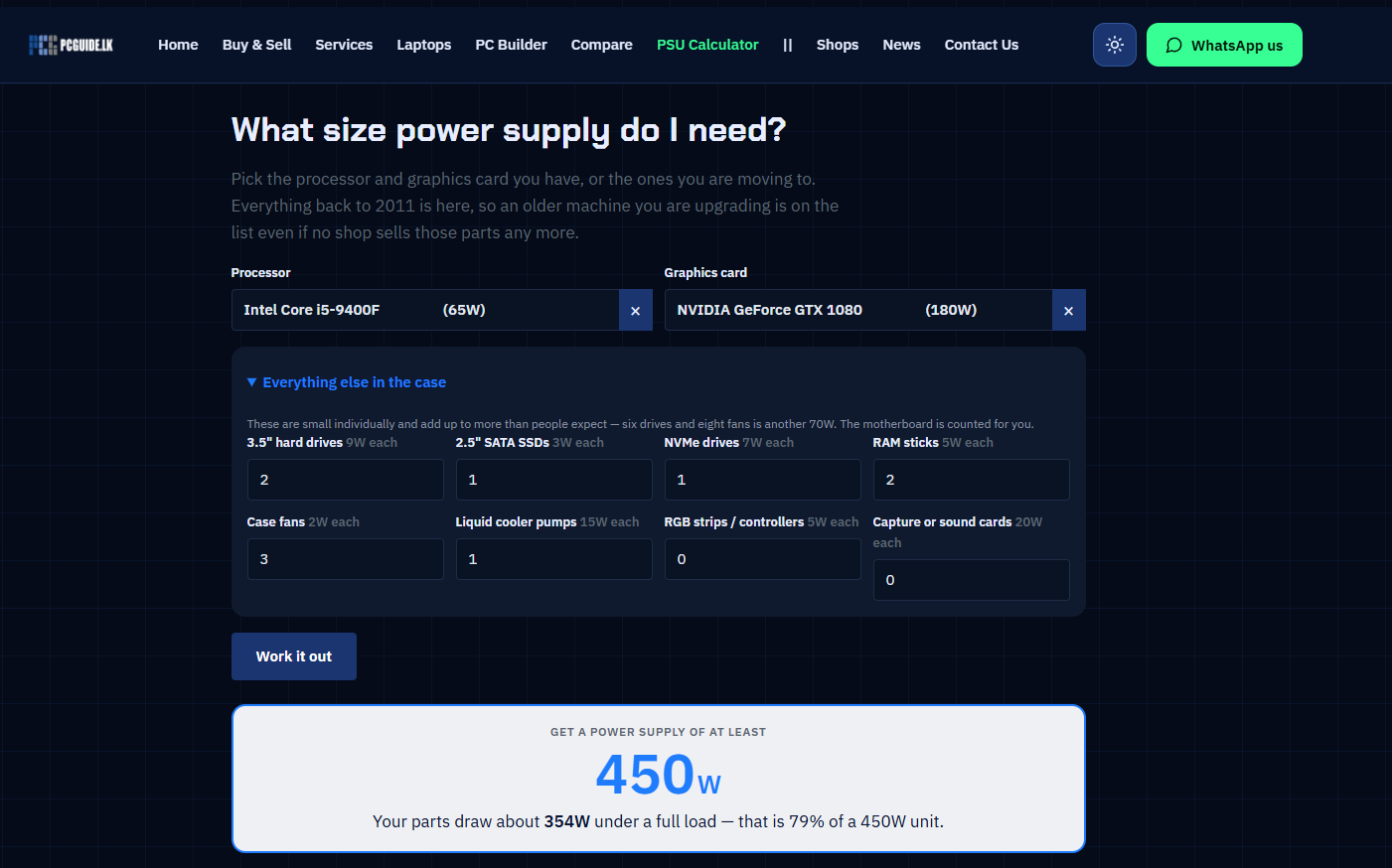
We ran a typical upgraded gaming PC through the calculator: an Intel Core i5-9400F (65W) and an NVIDIA GeForce GTX 1080 (180W), plus two hard drives, one SATA SSD, one NVMe drive, two RAM sticks, three case fans and an AIO liquid cooler.
Result: the parts draw about 354W at full load, so the calculator recommends a 450W power supply. That keeps the PSU at about 79% load — safe, with sensible headroom, without overspending.
Tips when buying your power supply
- Buy from a known brand with an 80 PLUS rating (Bronze or better). Cheap unbranded PSUs often can’t deliver their label wattage.
- Leave headroom for upgrades. If you plan a bigger GPU later, step up one size now.
- Check the connectors. Make sure the PSU has the PCIe power cables your graphics card needs.
- Mind the voltage. A quality PSU copes better with power fluctuations — worth considering with Sri Lankan grid conditions, ideally alongside a UPS.
More on the new PCGuide.lk
- Compare — put components or laptops side by side and see the differences at a glance.
- Shops — find computer shops across Sri Lanka and see what they offer.
- Buy & Sell — list your used PC parts or laptop, or find a second-hand bargain.
- Services — repairs, upgrades and custom builds from our team.
- News — tech news and updates still have a home here, now alongside the tools.
- Dark and light mode — switch themes with one tap, top right.
- WhatsApp support — stuck on a build? Message us directly from any page.
Frequently asked questions
Is PCGuide.lk free to use?
Yes. The PC Builder, Laptop Selector, PSU Calculator and Compare tools are all free. You don’t need an account to use them.
How do I know what PSU I need for my PC?
Add up the power your CPU, GPU and other parts draw at full load, then choose a power supply with headroom above that. Our PSU Calculator does this for you — just pick your processor and graphics card.
Is a 450W PSU enough for gaming?
For many mid-range builds, yes. For example, an Intel Core i5-9400F with a GTX 1080 draws about 354W, so a 450W unit is enough. More powerful GPUs need more, so check your exact parts in the calculator.
Can I use the PSU Calculator for an old PC?
Yes. It includes processors and graphics cards back to 2011, so you can check an older machine before upgrading its GPU.
Does the PC Builder show prices in Sri Lankan rupees?
Yes. The PC Builder is made for the Sri Lankan market, with prices in LKR.
What happened to the Sinhala tech articles?
PCGuide.lk has moved its focus to buying tools, but tech news continues in the News section.
Start planning your next PC or laptop
Whether you’re building your first gaming rig, picking a laptop for university or checking if your old PC can take a new graphics card, the new PCGuide.lk gives you the answers before you spend a rupee.
- Building a PC? Open the PC Builder
- Buying a laptop? Try the Laptop Selector
- Not sure about your power supply? Use the PSU Calculator
Tried the new tools? Tell us what you think, or what you’d like us to add next, on WhatsApp or in the comments below.